
November 23, 2026
Enhancements:
-
Bidders: Bidding Together
-
Couples, families, and table hosts can now bid together without merging their records. Each person keeps their own bidder number and bids, but everyone in the group can see each other's items, and any member can pay for the group's unpaid items using their own card. Every item shows who won it, so the right item goes home with the right person. Admins can set up groups in Manage Bidders, volunteers can add people at check-in in Butler, and bidders can invite each other right from the auction.
For full instructions and a walkthrough video, check out the how-to article.
-
-
Bidders: Bidders Without Bidder Numbers
-
Not every event needs paddles. If your guests bid from their phones, you can turn off bidder numbers and let bidders register, bid, check in, pay, and get receipts without one. Anywhere a number used to show, the bidder's name appears instead. Nothing changes unless you want it to. Every existing event keeps assigning numbers just like before. To turn it off, go to Auction Settings and update Auto Assign Bidder Number in Bidder Settings. You can add a number to any bidder later if you change your mind.
For full instructions and a walkthrough video, check out the how-to article.
-
-
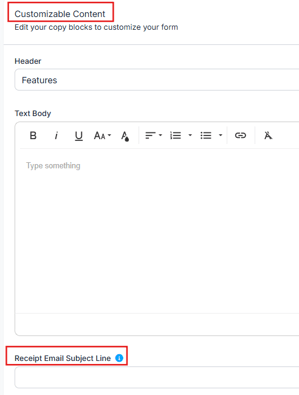
Event Tickets: Ticket Page Settings: Receipt Email Subject Line
Organizations can now customize the subject line of the ticket purchase receipt email. Find the new Receipt Email Subject Line field under Customizable Content in Ticket Page Settings. This is helpful when your event includes both ticket purchasers and sponsors and you want the subject to fit everyone. If the field is left blank, the default subject line is used, just like today. Default: "Organization Name ticket purchase"
-
Organization: API Settings: Table Seating
Table assignments now stay in sync between the API and the Table Seating tool. A table assigned through the API shows up in the Table Seating view, and a table assigned in the Table Seating view is included when guest information is pulled through the API.
Issues Resolved:
- Integrations:
- Salesforce:
- Salesforce exports now handle temporary connection errors more smoothly. Error notification emails have also been cleaned up so they are easier to read.
- The event name and event date now come across correctly, with the event name showing as the event and the date matching the auction closing date.
- Raiser's Edge: Over reporting of available constituents on import
- Virtuous: Large exports now finish reliably, the Virtuous Settings page loads faster, and validating collections no longer leaves a test contact behind in Virtuous.
- API Settings & Integrations:
- Read Only API Tokens:Read only API tokens are now available. These tokens can view event data but cannot make changes, so you can share access with partners and tools with confidence. Existing tokens are not affected.
- API token management now follows the same permission rules as the API Settings page, so only users with API settings access can create, rename, or delete tokens.
- Bidapp: Login: The one time passcode box is now easier to see on phones, making it quicker for bidders to find and enter their code when logging in.
- Butler: Checkout: Checkout now uses the most up to date bids, so receipts and charges always match the bids on the item.
- Reports: Event Overview: Totals for registrations with more than one line, such as tickets plus a sponsorship, now match the Sales Summary page.
- Bidapp: Login: Expired cards are now checked when a bidder logs in, so bidders at events that require a card are asked to add a new one before they start bidding.
- BidKit Payments App: The App Store listing no longer shows Mac as a compatible device, since Tap to Pay is only available on iPhones and iPads.
- EventStream: The video now stays in view when scrolling the page while watching a stream.
- Butler: Multi-Sale: The Place Holder button now works when filtering on All Items in the Multi-Sale section.
- Salesforce: