
October 26, 2026
Enhancements:
-
Integrations: Little Green Light
The Little Green Light integration is here! Connect your ClickBid event to your Little Green Light database to keep your constituent records, bidder information, and event sales in sync without manual re-entry. Import existing constituents as bidders, export bidder data back to Little Green Light, push sales as gifts, and set up automatic syncing on a schedule.
For full setup instructions, check out the Knowledge Base article.
- Integrations: CRM Error Notification Emails:
CRM error notification emails now include the event name, event ID, and event keyword so you can quickly identify which event triggered the error. This is especially helpful if you have more than one event connected to the same CRM. This update applies to all supported integrations including Neon, Salesforce, Blackbaud Raiser’s Edge NXT, Bloomerang, DonorPerfect, Little Green Light, Virtuous, and Classy.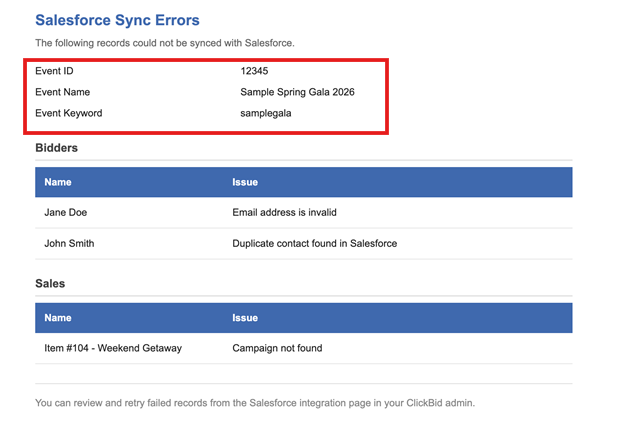
-
Event Tickets: Invoices: Fair Market Value
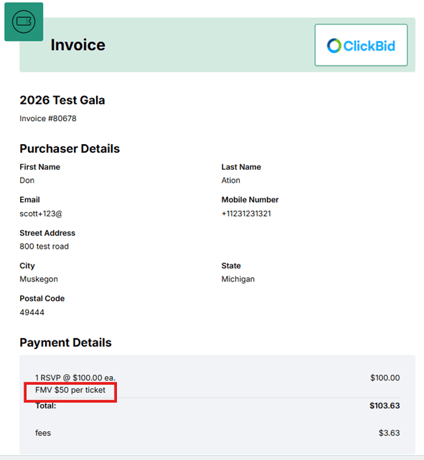
The Fair Market Value (FMV) now appears on ticket invoices and PDFs at the time the invoice is sent, not just on the receipt after payment. This applies to tickets, sponsorships, and underwriting purchases, giving sponsors and donors the information they need upfront for tax and accounting purposes.
- Ticket Page: Quantity Items
The quantity limit set under “# of Increments to Show” is now enforced on the ticket page. Purchasers can no longer add more than the allowed quantity to their cart using the counter, keeping the behavior consistent with the auction page. - Organization: Account: Address Fields: All address fields are now required when updating your organization account, with the exception of Address Line 2. The state field has also been updated to a dropdown to make entering your address quicker and more accurate.
- Auction: My Profile: Payment Method: The Payment Method section on the My Profile page will no longer appear if a payment method has not been set up in Auction Settings. This keeps the page clean and avoids confusion for events that only accept cash, checks, or other payment options.
- Bidders: Email and Text Bidders: Table Seating
Saved messages now correctly display the table name instead of the table ID when table seating is enabled.
Issues Resolved:
- Landing Page Builder: Content Blocks: Shadow Box: Shadow box settings in content blocks now save automatically in Chrome, consistent with how they already saved in Firefox.
- Landing Page Builder: Action Bar: Icon Search: An error that prevented non-super user roles from searching for icons in the Action Bar has been corrected. Icon search now works correctly for all user types.
- Software Settings: Sponsors: Sponsor URLs now support up to 400 characters, matching the limit already in place for images. Long URLs now wrap correctly in the display instead of breaking the layout. If a URL exceeds the limit, a clear message will appear rather than failing silently.
- Bidders:
- Mass Import: Bidder imports now handle incomplete or oversized data more gracefully. If any field exceeds the allowed length, a clear message will indicate which rows had issues so they can be corrected and re-imported.
- Bidders: Bidder Statements
Emailing a bidder statement on events without custom CSS was causing an error. This has been corrected. - Batch Update Bidder Numbers: Batch bidder number updates now follow the sort order applied to the table, so bidder numbers are assigned in the order you expect.
- Tags: Duplicate tags were being created on bidder records.
- Froala Editor Update: The Froala editor has been updated to version 5.5.0 to bring in the latest improvements and fixes.
- Integrations: Virtuous: Export Sales: When manually overriding a contact match on the Virtuous Export Sales page, the selected contact is now correctly used when the gift is filed. Previously the override was being ignored and the original matched contact was used instead.
- Donations/TTG: Settings: Custom Questions: The visibility setting for dropdown custom questions on the Donation Settings page now saves correctly and persists after a page refresh.
- Appeal Display: Custom Image Thermometer: The Custom Image Thermometer display was not loading when set to show Floor Bids only. This has been corrected and the display now loads as expected.
- Dashboard: In-Event: Unbid Items by Type: The direct link to the Unbid Items page has been restored next to “Unbid Items by Type” on the dashboard, making it quick and easy to review and adjust starting bids without extra navigation.
- Donation Settings: Secondary Color: Text Visibility: When a dark color such as black is chosen as the secondary color, the text displayed on buttons and inputs now automatically adjusts to remain readable. Text color is no longer hardcoded and will always contrast correctly with the selected background color.
- Integrations: DonorPerfect:
- An issue where the same ClickBid sale could be posted as two separate gifts in DonorPerfect has been corrected.
- The payment type tied to a sale in ClickBid now exports correctly to the Payment Type field in DonorPerfect.
- Event Tickets: Ticket Page Share Link: The share link on the ticket page was displaying an incorrect URL. This has been corrected.
- Integrations: Salesforce: The Salesforce integration now automatically refreshes the security token as needed to stay current with compliance requirements.
- Event Tickets: View Ticket Sales: Invoices: Invoices now display the correct totals when a sponsorship or underwriting refund is involved. The amounts will reflect accurately going forward
- Appeal Display: Standard Display: Scrolling Donor Names: The scrolling donor name display now updates smoothly when new donations come in. New donor names are added to the list without disrupting the display, and the overall layout has been improved to make better use of the full screen.
- Event Tickets: Custom Questions: Custom question answers submitted through the guest update link now correctly update the assigned bidder tag.
- Merchant Account: Bidder Statements and Receipts: The address entered on the merchant account page displays on bidder statements and receipts.