
August 31, 2026
Enhancements:
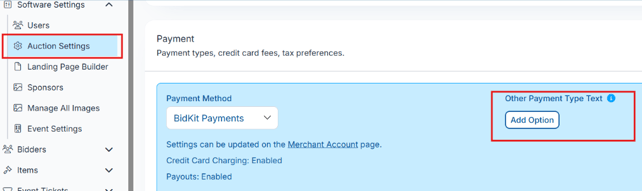
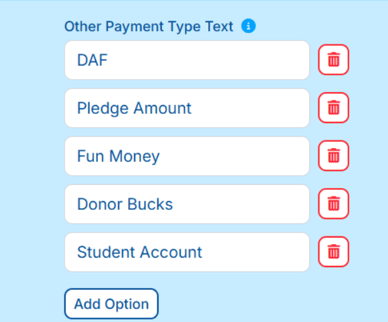
- Auction Settings: Payments: Change the "other' payment option as a drop down field.
- Organizations can now set up as many "Other" payment types as needed (examples: DAF Funds, Student Giving, Pledge, etc.)
- During checkout in Butler or Unpaid Checkouts, volunteers simply select the appropriate option from the list
- One payment type is selected per checkout
- If a donor has items that need to be split across different payment types, they are checked out separately and each receipt will reflect the correct payment type
Checking out in the butler: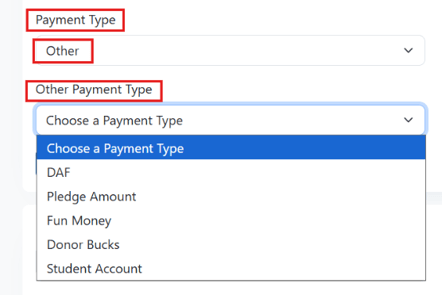
- Ticket Receipt:
- Header for Ticket purchase will match the title set under Ticket Page Settings>additional features>ticket title
- Added a Paid Status and updated the payment date/time
- Ticket Page updates:
- Ticket Guests/Sponsorship Guests: Guest details are now split by type and appear in the menu directly after the section they belong to, rather than in one combined section at the end.
- Guest Update link under manage guests allows you to send the guest update link to multiple purchasers at one time.
- Duplicate tickets, sponsorships, and underwriting.
- Drag and drop custom questions.
- Red Pay button on ticket page with total when a purchase is added to the cart.
- Ticket/sponsorship name added to the guest card.
- Updated navigation flow on ticket page for more mobile friendly.
- Manage all guest for multiple ticket pages.
- Automatic ticket page closing.
- Section icons can be changed/removed for desktop only.
- Guest titles for ticket/sponsorship
- Embed Ticket Page Option
- For the Knowledge Base article and section videos click here: How to Set up and Manage your Ticket Page
- Donor Perfect: New integration
-
-
- Import donors from DonorPerfect directly into your
event as bidders - Export bidders back to DonorPerfect as
constituents, with smart matching to avoid
duplicates - Export Sales as gifts, routed to the right campaign,
solicitation, and general ledger codes automatically - Custom field mapping, ClickBid data can write to
DonorPerfect User-Defined Fields on both donor
and gift records - Auto-sync keeps DonorPerfect current on a set
schedule without any manual action - Activity log so admins can see exactly what
synced and troubleshoot anything that didn't - For More information view this Knowledge base article: DonorPerfect
- Import donors from DonorPerfect directly into your
-
-
- Neon:
- Import bidders: The integration should allow users to view Neon Event attendees and import them into ClickBid as bidders, with their Neon Account ID linked so they can be exported back to Neon after the event without manual re-entry.
- Export sales: Matching bidders to existing Neon contacts is now smarter. If a last name, email, or phone number matches a Neon record, it will be flagged as a possible match for you to review. If all three match, the connection is made automatically with no extra steps needed.
-
API Settings: We made several improvements to the ClickBid API to make it easier for users to pull accurate financial data from events. Here is what changed:
- Donations are now a fully readable data source, including recurring donations and Text to Give.
- Checkouts can now be listed and filtered directly, making it easier for accounting and reporting tools to pull settled payment data.
- Event Financial Summary is now available as a single call that returns the full financial picture of an event, net of refunds, broken out by channel. The numbers match what the admin reports show.
- Auction: All Items: changed the design to add a filter & 'Viewing' in front of what filter is being viewed, added a box around the fields to help make it more noticeable for people to located the items they are winning, losing, watch, etc.
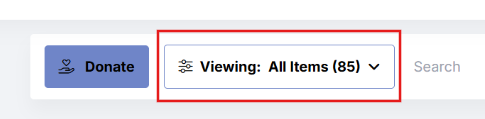
Desktop view:.png?width=726&height=354&name=desktop%20expanded%20(1).png)
Mobile view:.png?width=350&height=559&name=mobile%20view%20(1).png)
- Inactive events the saved precomposed email copy button & edit icons are hidden.
- Items: Manage Items: item bid history for silent item types, the batch delete bids is hidden since with silent items you can and should only be able to delete one at a time due to max bidding.
- Text Bidders/Email Bidders/ Welcome text: added a S.H.A.F.T word detection & warning.
-
ClickBid automatically checks your text messages for words that appear on the S.H.A.F.T. restricted word list as you type. This helps you catch potential compliance issues before sending.
How It Works
As you type your message, ClickBid will scan your content for S.H.A.F.T. restricted words. If a restricted word is detected:
- A yellow warning bar will appear below the text field showing you exactly how the word will be masked when sent to bidders. For example: Wine → W**e or Powerball → P*******l
- A popup will appear letting you know the word is on the S.H.A.F.T. list. Click Close to dismiss it and continue editing.
You can still use a flagged word in your message. It will be automatically masked when delivered to bidders so they will see the masked version rather than the original word. If you prefer, consider replacing the word with a neutral term or emailing bidders directly instead of texting. For more information here is the Knowledge base article: S.H.A.F.T. Censorship in ClickBid Messaging
Mass Messaging text Example: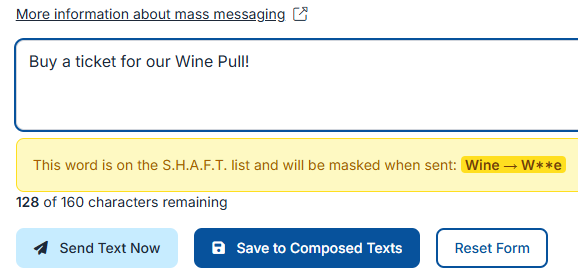
Popup that displays-Aug-28-2026-08-38-14-1903-PM.png?width=651&height=192&name=unnamed%20(1)-Aug-28-2026-08-38-14-1903-PM.png)
Welcome Text Example-Aug-28-2026-08-38-17-2794-PM.png?width=922&height=412&name=unnamed%20(2)-Aug-28-2026-08-38-17-2794-PM.png)
-
- . Admin: Welcome Page: AuctionGPT has been redesigned to give you clearer, more useful suggestions right where you need them, without the back-and-forth of an open-ended chat.
-2.png?width=400&height=350&name=image%20(1)-2.png)
- Item Share links: When sharing an item link on social media, text, or email, the preview image will now display the item image. If no item image is set up, it will fall back to the event logo, then the hero banner, and finally the first image on the page.
Issues Resolved:
- Event Tickets: Table Seating: Fixed an issue where the Print button on the Table Seating page was not working.
- BidKit Payments App: Fixed an issue where leaving the app idle until the screen locked could result in a blank screen when reopening, requiring a force close.
- BidKit Payments App: QR Code Scanning: Restored QR code scanning after fixing a camera permissions issue.
- Landing Page: Leaderboard Block: Fixed an issue where the Leaderboard content block was not loading correctly.
- Event Copying: Payment Settings: Fixed an issue where the sales tax rate was not carrying over when copying an event.
- Ticket Purchase: Fixed an issue where clicking the purchase button once could result in a duplicate ticket purchase being submitted.
- Bidapp & Display Cards: Item Packaging: Packaged items now show donor information the same way individual items do.
- Donations: The default state selection has been removed from the donation page. Donors now must choose their state before submitting, which helps prevent incorrect information from being saved.
- Recurring Donations: Fixed an issue where refreshing the page during a recurring donation setup could create a duplicate record for the same donor.
- Integrations:
- Virtuous: Fixed an issue where the Projects dropdown in Virtuous Settings was limited to 11 options.
- Salesforce: Fixed an issue where sales were being sent with the wrong status. They now send as "Posted" as expected.
- Blackbaud: The Blackbaud connection now works correctly across Firefox, Chrome, and Safari.