---
title: ClickBid 14.260622 Release
description: "This release brings powerful new tools to ClickBid, including: Item Packaging, Instant Payouts, Custom Table Messages, and more. Plus, copying events just got a whole lot easier with custom questions that carry over automatically."
---
[](https://try.cbo.io)
- [Features](https://try.cbo.io/features/)
- [Event and Auction Features](https://try.cbo.io/event-and-auction-features/)
- [Live Video EventStream](https://try.cbo.io/live-video-eventstream/)
- [Raise the Paddle](https://try.cbo.io/paddle-raise-events/)
- [Online Auctions](https://try.cbo.io/online-auction-software/)
- [Silent Auctions](https://try.cbo.io/silent-auction-software/)
- [Event Ticket Sales](https://try.cbo.io/event-ticket-sales/)
- [Mass Messaging](https://try.cbo.io/mass-messaging/)
- [Custom Event Pages](https://try.cbo.io/custom-landing-pages/)
- [Event Registration](https://try.cbo.io/event-registration/)
- [Fundraising Features](https://try.cbo.io/fundraising-features/)
- [Mobile Bidding Software](https://try.cbo.io/mobile-bidding-software/)
- [Online Donations](https://try.cbo.io/online-donation-platform/)
- [Peer to Peer Fundraising](https://try.cbo.io/peer-to-peer/)
- [Recurring Donations](https://try.cbo.io/recurring-donations/)
- [Text-to-Give](https://try.cbo.io/text-to-give-features/)
- Other Features
- [Integrations](https://try.cbo.io/integrations/)
- [AuctionGPT](https://try.cbo.io/auctiongpt/)
- [Dedicated Advisor](https://try.cbo.io/dedicated-advisor/)
- [About](https://try.cbo.io/about/)
- [Success Stories](https://try.cbo.io/success-stories/)
- [Account Management](https://try.cbo.io/account-management/)
- [Resources](https://try.cbo.io/resources/)
- [Partners](https://try.cbo.io/clickbid-partners/)
- [Contact Us](https://try.cbo.io/contact-us/)
- [Pricing](https://try.cbo.io/pricing/)
- [Resources](https://try.cbo.io/resources/)
- [Blog](https://blog.cbo.io)
- [Trust Center](https://clickbid.trust.site/)
- [Resources](https://try.cbo.io/resources/)
- Product
- Our platform
- [In-person auctions](https://try.cbo.io/in-person-auctions)
- [Online auctions](https://try.cbo.io/clickbid-online-auctions/)
- [Raise the paddle event](https://try.cbo.io/raise-the-paddle-event/)
- [Recurring donations](https://try.cbo.io/recurring-donations/)
- [Silent auctions](https://try.cbo.io/silent-auctions/)
- [Integrations](https://try.cbo.io/integrations/)
- Features
- [Custom landing pages](https://try.cbo.io/custom-landing-pages/)
- [Event ticket sales](https://try.cbo.io/event-ticket-sales/)
- [Dedicated Advisor](https://try.cbo.io/dedicated-advisor/)
- [Mass messaging](https://try.cbo.io/mass-messaging/)
- [Mobile bidding software](https://try.cbo.io/mobile-bidding-software/)
- [Live Video EventStream](https://try.cbo.io/live-video-eventstream/)
- [Text-To-Give](https://try.cbo.io/text-to-give/)
- [Account Management](https://try.cbo.io/account-management/)
- [View all features](https://try.cbo.io/pricing/#features)
- Company
- [About](https://try.cbo.io/about/)
- [Blog](https://blog.cbo.io)
- [Resources](https://try.cbo.io/resources/)
- [Contact us](https://try.cbo.io/contact-us/)
- [Pricing](https://try.cbo.io/pricing/)
- Top Resources
- [Nonprofit Silent Auction Software](https://blog.cbo.io/silent-auction-software)
- [How to Plan the Best Silent Auction](https://blog.cbo.io/plan-a-silent-auction)
- [Mobile Bidding Basics: A Mini Guide](https://blog.cbo.io/mobile-bidding-basics)
- [Log in](https://cbo.io/admin/login.php)
- [Get a Demo](https://try.cbo.io/demo)
- [Log in to ClickBid](https://cbo.io/admin/login.php)
- [Get a Demo](https://try.cbo.io/demo/)
# ClickBid 14.260622 Release
June 22, 2026
### Enhancements:
1. **Items: Item Packaging**
1. Combine two or more silent auction items into a single bundled package for bidding. It's a great way to group donated items from multiple donors into one exciting lot, without losing the original item records.
2. When building a package, AuctionGPT automatically suggests a title and description, and the Fair Market Value is totaled from all included items. The original items stay in the system but are hidden from bidders until the package is unlinked.
3. For full instructions and a walkthrough video, check out the [how-to article.](https://support.cbo.io/how-to-package-items-in-clickbid)
1.
2. Items: Manage Donors:
1. The Manage Donors page has been updated to make it easier to keep your donor records organized. You can now add and edit donors directly in the table, merge duplicate records, and expand any donor to see all the items they've donated.
2. A clean donor list means better Thank You Letters, accurate item displays, and less cleanup after your event.
3. For full instructions, check out the [how-to article.](https://support.cbo.io/managing-item-donors)
3. **Merchant Report: Instant Payouts:**
1. Need your event funds fast? Instant Payouts let eligible organizations request a same-day transfer to their bank account, available 24/7, including weekends and holidays. Funds typically arrive within 30 minutes.
2. Simply select the transactions you'd like to include, review the 1% fee and expected deposit amount, confirm with your password, and you're done. The daily maximum is $10,000, and only card payments are eligible.
3. For full details and a walkthrough video, check out the [how-to article](https://support.cbo.io/how-to-request-an-instant-payout-in-clickbid).
4. **EventStream:** Updated service provider
5. ** Software Settings: Auction Settings: Butler Settings & Bidders: Email Bidders & Text Bidders, Custom Table Message**
1. The \[t\] shortcode now has a customizable message to go along with it. Instead of always saying "You are seated at Table," you can tailor the message to match your event, whether that's a golf cart assignment, a VIP lounge, or a sign-up party.
2. Set it up once in Auction Settings under Butler Settings, and it will automatically be used any time the \[t\] shortcode is included in a welcome text or mass message.
3. When using the \[t\] shortcode in Text Bidders or Email Bidders, a note will appear showing exactly how the message will look when it's sent, with a quick link to update it right from there if needed.
4. For full details and a walkthrough video, check out the [how-to article](https://support.cbo.io/-setting-up-your-custom-table-message).
6. **Post Event Data Report: Item Sales Summary **
1. The Item Sales Summary report has been updated with a couple of improvements.
1. Refunded amounts are now correctly included in the totals, and refunds are broken out into two separate lines.
2. Item Refunds and Fees Refunded, making it easier to see exactly where the numbers are coming from.
3. The "Total" label for Silent, Live, Quantity, and Donation items has also been renamed to "Paid" for clarity.
4. The Event Sales Summary has been updated to reflect these changes as well.
7. **CSV Reports: Phone Number Formatting**
- Phone numbers in CSV downloads will no longer include the + symbol. This means you can copy and paste phone numbers directly from the file without needing to use a formula to clean them up first.
8. **Welcome Page: Payment Pending Notice**
- When an invoice is outstanding, the payment pending notice will now appear in the left-hand menu instead of on the main event dashboard. This keeps your event information visible and easy to access while your invoice is being processed.
9. ** Address Fields: AE Added as a State Option**
- Armed Forces Europe (AE) has been added as a state option in address fields, making it easier to accommodate attendees with military addresses.
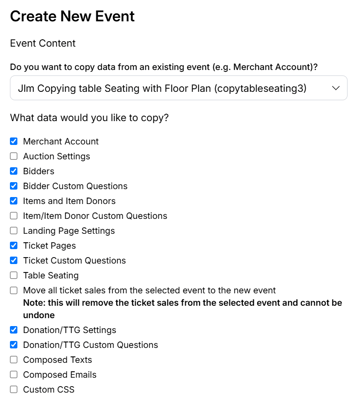
10. **Organization: Events: Copying Events**
1. When copying a previous event, more of your custom setup will now carry over automatically. The following will copy to your new event:
1. Custom questions for Tickets, Sponsorships, and Underwriting
2. Custom questions for the Donation Item and Donate Item form
3. Custom questions for the New Bidder Registration form
4. Donation and Text-to-Give settings and custom questions
11. **Butler: Multi-Sale: Mobile View**
- The Multi-Sale screen on mobile has been improved. Quantity numbers and buttons no longer overlap, making it easier for volunteers to use on a phone or tablet during your event.
12. **Software Settings: Sponsors**
- A helpful reminder has been added to the Sponsors settings page letting you know that sponsors won't appear on your event page until a Sponsors content block has been added in the Landing Page Builder.

#### Issues Resolved:
**1. Landing Page Builder**
- **Content Blocks> HEX Color Field:** The HEX color field now only accepts the standard 6-character format and no longer auto-expands. Entering custom colors is more straightforward and predictable.
- **Content Blocks> Editing Toolbar:** Fixed an issue where the formatting toolbar would disappear while editing a content block.
- **Content Blocks> Duplicate Toolbar:** Resolved an issue where two toolbars were appearing at the same time while editing. Only the ClickBid toolbar will now display.
- **Bullet Points:** Fixed an issue where bullet points weren't showing on the editing side, even though they appeared correctly in the preview.
- **Action Bar>Ticket Page Links:** Links in the action bar can now point to any section of the ticket page, not just "Event Details" and "Guest Details."
**2. Ticket Page**
- **Invoice PDF:** Invoice PDFs now load with the correct formatting.
- **Invoice Email (Outlook):** Fixed an Outlook-specific issue where invoice emails could show raw code in the email body instead of a clean, formatted message.
- **Duplicate Bidder Records:** Resolved an issue where the same phone number saved in two different formats (e.g., 9891112222 and +19891112222) could create duplicate bidder records.
**3. Event Central**
- **Event Payments> Paid Checkouts:** Fixed an issue where quantity and donation purchases marked as "invoiced" from the ticket page were incorrectly showing in the Paid Checkouts area. These items will now only appear there once the invoice has been paid.
- **Leaderboard >Share Link:** Dollar amounts of $1,000 or more now consistently display with the $ symbol.
**4. Integrations: Bloomeran:** Fixed an issue on the Bloomerang activity log page where unsupported filter options were showing up.
**5. Items: Manage Items> Max Bid History:** Fixed an issue with bid history when a bidder's number was changed after a max bid had already been placed.
**6. Software Settings: Butler> Table Name Token:** When table seating is enabled, the table name token length is now set automatically based on the longest table name, so it always fits correctly.
**7. Bidders: Manage Bidders >Bulk Table Name Update:** You can now update table names in bulk when table seating is enabled.
**8. Bidapp: Bidder Registration> Default State:** The default state field is now blank. If an address isn't required, receipts will no longer incorrectly show "AL" during checkout.
9. Bidders: Chat: When chat was set to yes the chat bubble did not display in the auction.
## Share:
###### Get The Latest Updates
##### Subscribe To Our Monthly Newsletter
No spam, notifications only about new products, updates.
[Subscribe](https://blog.cbo.io/release-notes/clickbid-14.260622-release#subscribe)
[Previous ClickBid 14.260526 Release](https://blog.cbo.io/release-notes/clickbid-14.260526-release)
## Related Posts
## Become a subscriber
Subscribe to our blog and get the latest updates straight to your inbox.
ClickBid
ClickBid’s Event Fundraising Platform is the premier software for charities, specializing in ticket sales, event promotions, and auctions.
[Pricing](https://clickbidonline.com/pricing/)
[Schedule a demo](https://try.cbo.io/demo/)
- [Resources](https://try.cbo.io/resources/)
- [Blog](https://blog.cbo.io)
- [Product Roadmap](https://try.cbo.io/product-roadmap/)
- [Comparison Calculator](https://try.cbo.io/calculator/)
- [Heads or Tails Generator](https://try.cbo.io/heads-or-tails-generator/)
- [Submit a Referral](https://try.cbo.io/referral/)
- [Features](https://try.cbo.io/features/)
- [Event and Auction Features](https://try.cbo.io/event-and-auction-features/)
- [Live Video EventStream](https://try.cbo.io/live-video-eventstream/)
- [Raise the Paddle](https://try.cbo.io/paddle-raise-events/)
- [Online Auctions](https://try.cbo.io/online-auction-software/)
- [Silent Auctions](https://try.cbo.io/silent-auction-software/)
- [Event Ticket Sales](https://try.cbo.io/event-ticket-sales/)
- [Mass Messaging](https://try.cbo.io/mass-messaging/)
- [Custom Event Pages](https://try.cbo.io/custom-landing-pages/)
- [Event Registration](https://try.cbo.io/event-registration/)
- [Fundraising Features](https://try.cbo.io/fundraising-features/)
- [Mobile Bidding Software](https://try.cbo.io/mobile-bidding-software/)
- [Online Donations](https://try.cbo.io/online-donation-platform/)
- [Peer to Peer Fundraising](https://try.cbo.io/peer-to-peer/)
- [Recurring Donations](https://try.cbo.io/recurring-donations/)
- [Text to Give](https://try.cbo.io/text-to-give-features/)
- Other Features
- [Integrations](https://try.cbo.io/integrations/)
- [AuctionGPT](https://try.cbo.io/auctiongpt/)
- [Dedicated Advisor](https://try.cbo.io/dedicated-advisor/)
- Company
- [About us](https://try.cbo.io/about)
- [Blog](https://blog.cbo.io)
- [Legalese](https://try.cbo.io/legalese/)
- [Contact us](https://try.cbo.io/contact-us/)
- [Trust Center](https://clickbid.trust.site/)
- [API Documentation](https://documenter.getpostman.com/view/28996908/2s9XxzuCTq)
##### Our Office
800 East Ellis Suite 533
Norton Shores, MI 49441
Phone: (800) 513-5097
Fax: (231) 799-4999
© 2002 - 2026. All rights reserved.
```json
{
"@context" : "https://schema.org",
"@type" : "BlogPosting",
"author" : {
"@type" : "Person",
"name" : "Jodi Merkins",
"url" : "https://blog.cbo.io/release-notes/author/jodi-merkins"
},
"dateModified" : "2026-06-22T11:32:02.519Z",
"datePublished" : "2026-06-22T11:32:02.000Z",
"headline" : "ClickBid 14.260622 Release",
"mainEntityOfPage" : {
"@id" : "https://blog.cbo.io/release-notes/clickbid-14.260622-release",
"@type" : "WebPage"
},
"publisher" : {
"@type" : "Organization",
"logo" : {
"@type" : "ImageObject",
"url" : "https://blog.cbo.io/hubfs/clickbid_logo_22-1.png"
},
"name" : "ClickBid"
}
}
```