---
title: ClickBid 14.260427 Release
description: Updates to invoicing and customization settings to provide greater flexibility, clearer formatting, and a more streamlined experience for users.
---
[](https://try.cbo.io)
- [Features](https://try.cbo.io/features/)
- [Event and Auction Features](https://try.cbo.io/event-and-auction-features/)
- [Live Video EventStream](https://try.cbo.io/live-video-eventstream/)
- [Raise the Paddle](https://try.cbo.io/paddle-raise-events/)
- [Online Auctions](https://try.cbo.io/online-auction-software/)
- [Silent Auctions](https://try.cbo.io/silent-auction-software/)
- [Event Ticket Sales](https://try.cbo.io/event-ticket-sales/)
- [Mass Messaging](https://try.cbo.io/mass-messaging/)
- [Custom Event Pages](https://try.cbo.io/custom-landing-pages/)
- [Event Registration](https://try.cbo.io/event-registration/)
- [Fundraising Features](https://try.cbo.io/fundraising-features/)
- [Mobile Bidding Software](https://try.cbo.io/mobile-bidding-software/)
- [Online Donations](https://try.cbo.io/online-donation-platform/)
- [Peer to Peer Fundraising](https://try.cbo.io/peer-to-peer/)
- [Recurring Donations](https://try.cbo.io/recurring-donations/)
- [Text-to-Give](https://try.cbo.io/text-to-give-features/)
- Other Features
- [Integrations](https://try.cbo.io/integrations/)
- [AuctionGPT](https://try.cbo.io/auctiongpt/)
- [Dedicated Advisor](https://try.cbo.io/dedicated-advisor/)
- [About](https://try.cbo.io/about/)
- [Success Stories](https://try.cbo.io/success-stories/)
- [Account Management](https://try.cbo.io/account-management/)
- [Resources](https://try.cbo.io/resources/)
- [Partners](https://try.cbo.io/clickbid-partners/)
- [Contact Us](https://try.cbo.io/contact-us/)
- [Pricing](https://try.cbo.io/pricing/)
- [Resources](https://try.cbo.io/resources/)
- [Blog](https://blog.cbo.io)
- [Trust Center](https://clickbid.trust.site/)
- [Resources](https://try.cbo.io/resources/)
- Product
- Our platform
- [In-person auctions](https://try.cbo.io/in-person-auctions)
- [Online auctions](https://try.cbo.io/clickbid-online-auctions/)
- [Raise the paddle event](https://try.cbo.io/raise-the-paddle-event/)
- [Recurring donations](https://try.cbo.io/recurring-donations/)
- [Silent auctions](https://try.cbo.io/silent-auctions/)
- [Integrations](https://try.cbo.io/integrations/)
- Features
- [Custom landing pages](https://try.cbo.io/custom-landing-pages/)
- [Event ticket sales](https://try.cbo.io/event-ticket-sales/)
- [Dedicated Advisor](https://try.cbo.io/dedicated-advisor/)
- [Mass messaging](https://try.cbo.io/mass-messaging/)
- [Mobile bidding software](https://try.cbo.io/mobile-bidding-software/)
- [Live Video EventStream](https://try.cbo.io/live-video-eventstream/)
- [Text-To-Give](https://try.cbo.io/text-to-give/)
- [Account Management](https://try.cbo.io/account-management/)
- [View all features](https://try.cbo.io/pricing/#features)
- Company
- [About](https://try.cbo.io/about/)
- [Blog](https://blog.cbo.io)
- [Resources](https://try.cbo.io/resources/)
- [Contact us](https://try.cbo.io/contact-us/)
- [Pricing](https://try.cbo.io/pricing/)
- Top Resources
- [Nonprofit Silent Auction Software](https://blog.cbo.io/silent-auction-software)
- [How to Plan the Best Silent Auction](https://blog.cbo.io/plan-a-silent-auction)
- [Mobile Bidding Basics: A Mini Guide](https://blog.cbo.io/mobile-bidding-basics)
- [Log in](https://cbo.io/admin/login.php)
- [Get a Demo](https://try.cbo.io/demo)
- [Log in to ClickBid](https://cbo.io/admin/login.php)
- [Get a Demo](https://try.cbo.io/demo/)
# ClickBid 14.260427 Release
April 27, 2026
#### Enhancements:
1. Ticket Page Invoice improvements
- Invoices now support additional customization to match your organization’s branding and communication style.
- The logo can be display on the invoice
- Customizing the Invoice Email message
- located under Ticket page settings>Customizable Content>Invoice Email Message
- Adding additional information to the invoice which will display in the Payment Details section of the invoice.
- Ability to batch send invoice links
- Ability to change a check or cash payment type to allow the purchase to be invoiced.
- View ticket sales changed the menu to the right to a vertical ellipsis 
- View ticket sales: Updated the icons and verbiage under the menu
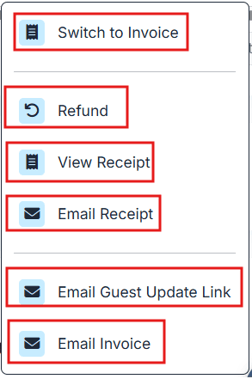
- For more details and a video please see the [how to article](https://support.cbo.io/send-invoice-feature-in-ticket-page-settings)
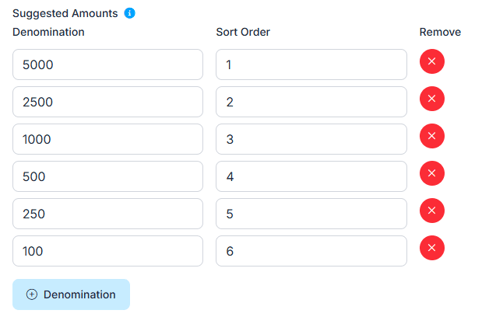
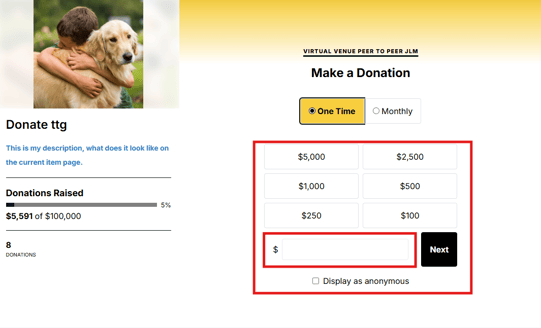
2. Donations/Text-to-Give: In the settings changed how to add denominations to match how they are done under Manage items.
1. Click the button for Denomination to add the amounts and what sort order they are to be displayed on the donation page.

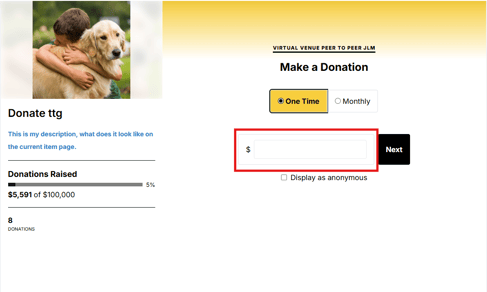
2. Can add as many denominations as you wish. There will also be a 'other' field for the donor to add their own amount. If you do not add any denominations the other field will display as default.
3. Items: Manage Items:
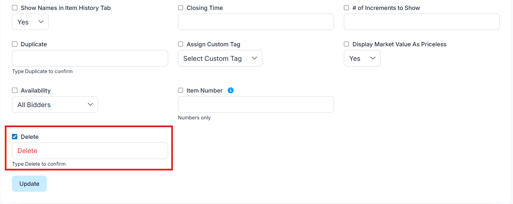
1. 1. Moved the delete field to display above the 'Update' button
2. When typing delete the letters will display in Bold Red
- This will help call out that this is a warning you are about to delete items
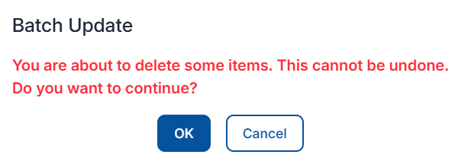
3. Upon clicking the update button the popup verbiage will now be in bold red.
Popup that displays:
##### Issues Resolved:
1. Event Tickets: Table Seating:
1. Deleting a guest will no longer cause problems with the guest list. The list will continue to load normally after a guest is removed.
2. Guests who only have a first name entered will now display properly in table seating, instead of showing as “null.”
3. Table sizes will now stay consistent when refreshing the page or leaving and coming back, even when a floor plan is uploaded.
4. Ticket Type Information Missing
5. Guest Questions Not Showing
6. Guest List Loading Slowly
7. Uploading bidder templates will now correctly assign tables for events using table seating.
8. Tables will now stay in place when you zoom in or out. Zooming only changes your view, not where tables are positioned.
9. Table sizes will now stay the same, even after refreshing or changing your screen size.
10. Table numbers will now appear in the correct order (1–9, then 10–99, then 100+), making them easier to follow.
2. Items: Manage Items
1. The Fair Market Value (FMV) field now only accepts numbers to keep data accurate.
2. Item numbers can no longer be set to “0.”
3. Donation Items: Projected display settings: Standard Display: including all donations (including TTG), and donor names will show consistently.
3. Auction GPT loads properly and no longer gets stuck on a loading screen.
4. Donations/TTG: If a donation has an error, the purchase will not go through and the card will not be charged.
5. Manage Bidders:
1. Text Bidders: Clicking “Save to Composed” multiple times will no longer create duplicate messages. The button is now disabled after the first click to prevent repeats.
2. When sending a single text message, the bidder number field will now clear automatically after sending, making it easier to send another message.
3. When a guest is converted to a bidder, their table assignment will now show and stay accurate across the system.
6. Auction: Account: Table information is displaying the correct table name
7. Organization: Merchant Report
1. Donation reports on the ticket page now show the correct admin fee for each transaction.
2. Refunded auction purchases now display admin fees correctly.
3. Merchant reports now only show transactions that have been fully processed and paid out.
8. Event tickets:
1. Sales Summary: Table names now display correctly in the sales summary.
9. Organization>Events: Tickets can no longer be purchased if the event or ticket page is inactive, even when using a direct link.
10. Ticket Page: When saving a credit card during ticket purchase the card is defaulted in Stripe so no errors happen when checking out at the event.
11. Integrations: Neon: Large exports to Neon now complete reliably and will no longer be stuck in "pending" status.
12. Auction: “Connection lost or needs to be reestablished”
13. Butler: Bidder look up
1. You can now search for tables in Butler using the table name or number more easily.
2. Displays the correct table name for all users regardless if you have permission to table seating, when looking up bidders, making it easier to read and understand.
## Share:
###### Get The Latest Updates
##### Subscribe To Our Monthly Newsletter
No spam, notifications only about new products, updates.
[Subscribe](https://blog.cbo.io/release-notes/clickbid-14.260427-release#subscribe)
[Previous ClickBid 14.260330 Release](https://blog.cbo.io/release-notes/clickbid-14.260330-release)
[Next ClickBid 14.260526 Release](https://blog.cbo.io/release-notes/clickbid-14.260526-release)
## Related Posts
## Become a subscriber
Subscribe to our blog and get the latest updates straight to your inbox.
ClickBid
ClickBid’s Event Fundraising Platform is the premier software for charities, specializing in ticket sales, event promotions, and auctions.
[Pricing](https://clickbidonline.com/pricing/)
[Schedule a demo](https://try.cbo.io/demo/)
- [Resources](https://try.cbo.io/resources/)
- [Blog](https://blog.cbo.io)
- [Product Roadmap](https://try.cbo.io/product-roadmap/)
- [Comparison Calculator](https://try.cbo.io/calculator/)
- [Heads or Tails Generator](https://try.cbo.io/heads-or-tails-generator/)
- [Submit a Referral](https://try.cbo.io/referral/)
- [Features](https://try.cbo.io/features/)
- [Event and Auction Features](https://try.cbo.io/event-and-auction-features/)
- [Live Video EventStream](https://try.cbo.io/live-video-eventstream/)
- [Raise the Paddle](https://try.cbo.io/paddle-raise-events/)
- [Online Auctions](https://try.cbo.io/online-auction-software/)
- [Silent Auctions](https://try.cbo.io/silent-auction-software/)
- [Event Ticket Sales](https://try.cbo.io/event-ticket-sales/)
- [Mass Messaging](https://try.cbo.io/mass-messaging/)
- [Custom Event Pages](https://try.cbo.io/custom-landing-pages/)
- [Event Registration](https://try.cbo.io/event-registration/)
- [Fundraising Features](https://try.cbo.io/fundraising-features/)
- [Mobile Bidding Software](https://try.cbo.io/mobile-bidding-software/)
- [Online Donations](https://try.cbo.io/online-donation-platform/)
- [Peer to Peer Fundraising](https://try.cbo.io/peer-to-peer/)
- [Recurring Donations](https://try.cbo.io/recurring-donations/)
- [Text to Give](https://try.cbo.io/text-to-give-features/)
- Other Features
- [Integrations](https://try.cbo.io/integrations/)
- [AuctionGPT](https://try.cbo.io/auctiongpt/)
- [Dedicated Advisor](https://try.cbo.io/dedicated-advisor/)
- Company
- [About us](https://try.cbo.io/about)
- [Blog](https://blog.cbo.io)
- [Legalese](https://try.cbo.io/legalese/)
- [Contact us](https://try.cbo.io/contact-us/)
- [Trust Center](https://clickbid.trust.site/)
- [API Documentation](https://documenter.getpostman.com/view/28996908/2s9XxzuCTq)
##### Our Office
800 East Ellis Suite 533
Norton Shores, MI 49441
Phone: (800) 513-5097
Fax: (231) 799-4999
© 2002 - 2026. All rights reserved.
```json
{
"@context" : "https://schema.org",
"@type" : "BlogPosting",
"author" : {
"@type" : "Person",
"name" : "Jodi Merkins",
"url" : "https://blog.cbo.io/release-notes/author/jodi-merkins"
},
"dateModified" : "2026-04-27T12:54:14.199Z",
"datePublished" : "2026-04-27T12:54:14.000Z",
"headline" : "ClickBid 14.260427 Release",
"mainEntityOfPage" : {
"@id" : "https://blog.cbo.io/release-notes/clickbid-14.260427-release",
"@type" : "WebPage"
},
"publisher" : {
"@type" : "Organization",
"logo" : {
"@type" : "ImageObject",
"url" : "https://blog.cbo.io/hubfs/clickbid_logo_22-1.png"
},
"name" : "ClickBid"
}
}
```