---
title: ClickBid 14.260325 Release
description: Explore the latest software updates, including new features, usability improvements, and performance enhancements to keep your experience running smoothly.
---
[](https://try.cbo.io)
- [Features](https://try.cbo.io/features/)
- [Event and Auction Features](https://try.cbo.io/event-and-auction-features/)
- [Live Video EventStream](https://try.cbo.io/live-video-eventstream/)
- [Raise the Paddle](https://try.cbo.io/paddle-raise-events/)
- [Online Auctions](https://try.cbo.io/online-auction-software/)
- [Silent Auctions](https://try.cbo.io/silent-auction-software/)
- [Event Ticket Sales](https://try.cbo.io/event-ticket-sales/)
- [Mass Messaging](https://try.cbo.io/mass-messaging/)
- [Custom Event Pages](https://try.cbo.io/custom-landing-pages/)
- [Event Registration](https://try.cbo.io/event-registration/)
- [Fundraising Features](https://try.cbo.io/fundraising-features/)
- [Mobile Bidding Software](https://try.cbo.io/mobile-bidding-software/)
- [Online Donations](https://try.cbo.io/online-donation-platform/)
- [Peer to Peer Fundraising](https://try.cbo.io/peer-to-peer/)
- [Recurring Donations](https://try.cbo.io/recurring-donations/)
- [Text-to-Give](https://try.cbo.io/text-to-give-features/)
- Other Features
- [Integrations](https://try.cbo.io/integrations/)
- [AuctionGPT](https://try.cbo.io/auctiongpt/)
- [Dedicated Advisor](https://try.cbo.io/dedicated-advisor/)
- [About](https://try.cbo.io/about/)
- [Success Stories](https://try.cbo.io/success-stories/)
- [Account Management](https://try.cbo.io/account-management/)
- [Resources](https://try.cbo.io/resources/)
- [Partners](https://try.cbo.io/clickbid-partners/)
- [Contact Us](https://try.cbo.io/contact-us/)
- [Pricing](https://try.cbo.io/pricing/)
- [Resources](https://try.cbo.io/resources/)
- [Blog](https://blog.cbo.io)
- [Trust Center](https://clickbid.trust.site/)
- [Resources](https://try.cbo.io/resources/)
- Product
- Our platform
- [In-person auctions](https://try.cbo.io/in-person-auctions)
- [Online auctions](https://try.cbo.io/clickbid-online-auctions/)
- [Raise the paddle event](https://try.cbo.io/raise-the-paddle-event/)
- [Recurring donations](https://try.cbo.io/recurring-donations/)
- [Silent auctions](https://try.cbo.io/silent-auctions/)
- [Integrations](https://try.cbo.io/integrations/)
- Features
- [Custom landing pages](https://try.cbo.io/custom-landing-pages/)
- [Event ticket sales](https://try.cbo.io/event-ticket-sales/)
- [Dedicated Advisor](https://try.cbo.io/dedicated-advisor/)
- [Mass messaging](https://try.cbo.io/mass-messaging/)
- [Mobile bidding software](https://try.cbo.io/mobile-bidding-software/)
- [Live Video EventStream](https://try.cbo.io/live-video-eventstream/)
- [Text-To-Give](https://try.cbo.io/text-to-give/)
- [Account Management](https://try.cbo.io/account-management/)
- [View all features](https://try.cbo.io/pricing/#features)
- Company
- [About](https://try.cbo.io/about/)
- [Blog](https://blog.cbo.io)
- [Resources](https://try.cbo.io/resources/)
- [Contact us](https://try.cbo.io/contact-us/)
- [Pricing](https://try.cbo.io/pricing/)
- Top Resources
- [Nonprofit Silent Auction Software](https://blog.cbo.io/silent-auction-software)
- [How to Plan the Best Silent Auction](https://blog.cbo.io/plan-a-silent-auction)
- [Mobile Bidding Basics: A Mini Guide](https://blog.cbo.io/mobile-bidding-basics)
- [Log in](https://cbo.io/admin/login.php)
- [Get a Demo](https://try.cbo.io/demo)
- [Log in to ClickBid](https://cbo.io/admin/login.php)
- [Get a Demo](https://try.cbo.io/demo/)
# ClickBid 14.260325 Release
March 25, 2026
#### Enhancements:
1. Reports: Post Event Data Updates:
1. Processing Report: Transactions:
- When a transaction is refunded, the original transaction will show the Fees Donated now.
- Donation/TTG transactions are showing the Fees Donated now.
2. An update was made to the query that produces the Processing Report > Sum of Transactions. The previous logic had the potential to overstate the numbers slightly. The query also runs much faster now.
3. Items: Added Live Items Won: This includes winning bid, all winning bidders, item donor, and solicitor information.
4. Donations: Added Donation totals by question response: This provides total donation amounts per any donation item's custom question responses.
2. Landing Page Builder: Settings: The option to hide the Sign In / Sign Up section has been restored.
3. . Ticket Page: Ticket Page Settings: Customizable Content: Receipt Header:
1. If a custom message is added to the Receipt Header field, the Ticket Receipt (admin/ticket\_receipt) will display only the custom message.
-1.png?width=284&height=278&name=image%20(60)-1.png)
2. If no custom message is entered, the default message, “Thank you for your order!”, will display
-1.png?width=337&height=209&name=image%20(61)-1.png)
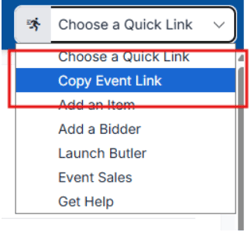
4. Event: Welcome Page: Navigation bar "Choose a Quick Link" now includes "Copy Event Link."
5. Auction site: The “Connection Lost or Needs to be Reestablished” message has been improved by increasing the timeout to 65 seconds.This provides additional leeway and helps reduce false disconnects while maintaining connection reliability.
6. Ticket Page: Invoice Payment: Verbiage updates for invoice type checkout confirmation popup:
-1.png?width=357&height=173&name=image%20(62)-1.png)
7. Text Bidders & Email Bidders: Update old Legacy verbiage in a templated mass text message to remove the 'red pay' and add 'shopping cart'

#### Issues Resolved:
1. Event Tickets:
1. Modify Tickets:
1. Ticket Prices & FMV: When editing Individual, Sponsorship, or Underwriting tickets, the system now automatically removes symbols like $ and commas from the Price and FMV fields. This ensures the correct amounts are saved and totals are calculated accurately.
2. Once a response has been submitted on the Ticket Page, you can no longer change a custom question from “Guest Record” to “Ticket” (or vice versa). This applies to both dropdown and text questions and helps keep data accurate and consistent.
2. Ticket Purchase: When an error occurs (a ticket type is deleted, or a name is too long, for example), the purchaser will receive an appropriate error. The purchase will not complete and will not be charged through Stripe.
3. Manage Guests:
1. Gridview: Custom question responses edited in Manage Guests gridview will now properly save and update as expected.
2. CSV: The system now matches guest records using the Ticket ID instead of the Ticket Name, allowing ticket names to be updated without affecting existing guest data or CSV exports.
3. Download Manage Guests: An issue occurred when exporting the Manage Guests download where names containing accented characters were converted to symbols. This has been corrected so accented characters now export properly and remain intact in the downloaded file.
4. Guest Update Link: Displays purchaser last name (Available Guest - (Purchaser Last Name)) instead of the ticket name as purchaser last name on the guest update link.
2. ADA compliance updates:
1. 1. Accessibility reflow issue with side nav
2. Accessibility issue with duplicate and missing landmarks
3. tickets: Accessibility issue with "Show More" links on tickets
4. donate: Accessibility issue with custom amount
input field
5. tickets: Accessibility issue with guest details' Phone Number input field
6. Accessibility: Screen
readers need to read notifications without having to focus on them
7. Accessibility - add a "skip to main content"
link at the top of the page for screen readers
8. Screen readers read side nav links when the menu isn't showing
3. Bidders: Manage Bidders: Details/Edit Pencil: Address: When opening a bidder address and clicking complete and go back, when switching too a new bidder address field, the field will expand and allow edits.
4. User Permissions: When a user does not have permissions to software settings, it will no longer show in the left side menu.
5. Integrations:
1. Bloomerang: Updated the API to force an "other" ClickBid payment type to a "cash" payment type in Bloomerang.
2. Export sales: Neon/Salesforce/Boomerang/Blackbaud Raiser's Edge NXT: Exports will now handle cases where the bidder ID no longer exists, preventing database errors and allowing the sale to export successfully.
3. Dashboard: Salesforce/Virtuous/Neon/Bloomerang: When a connection is not established, or if a connection attempt fails, the system will now display a clear error message explaining why the connection was not successful.
6. Item Donation Form: All items submitted through the donation form, including those submitted via content blocks and the action bar, are now automatically assigned item numbers in the 9000s.
7. Landing Page: Social media icons no longer disappear when scrolling or zooming.
8. Event Central: Live Broadcast: Stream public viewing URL has been updated.
## Share:
###### Get The Latest Updates
##### Subscribe To Our Monthly Newsletter
No spam, notifications only about new products, updates.
[Subscribe](https://blog.cbo.io/release-notes/clickbid-14.260325-release#subscribe)
[Previous ClickBid 14.260216 Release](https://blog.cbo.io/release-notes/clickbid-14.260216-release)
[Next ClickBid 14.260330 Release](https://blog.cbo.io/release-notes/clickbid-14.260330-release)
## Related Posts
## Become a subscriber
Subscribe to our blog and get the latest updates straight to your inbox.
ClickBid
ClickBid’s Event Fundraising Platform is the premier software for charities, specializing in ticket sales, event promotions, and auctions.
[Pricing](https://clickbidonline.com/pricing/)
[Schedule a demo](https://try.cbo.io/demo/)
- [Resources](https://try.cbo.io/resources/)
- [Blog](https://blog.cbo.io)
- [Product Roadmap](https://try.cbo.io/product-roadmap/)
- [Comparison Calculator](https://try.cbo.io/calculator/)
- [Heads or Tails Generator](https://try.cbo.io/heads-or-tails-generator/)
- [Submit a Referral](https://try.cbo.io/referral/)
- [Features](https://try.cbo.io/features/)
- [Event and Auction Features](https://try.cbo.io/event-and-auction-features/)
- [Live Video EventStream](https://try.cbo.io/live-video-eventstream/)
- [Raise the Paddle](https://try.cbo.io/paddle-raise-events/)
- [Online Auctions](https://try.cbo.io/online-auction-software/)
- [Silent Auctions](https://try.cbo.io/silent-auction-software/)
- [Event Ticket Sales](https://try.cbo.io/event-ticket-sales/)
- [Mass Messaging](https://try.cbo.io/mass-messaging/)
- [Custom Event Pages](https://try.cbo.io/custom-landing-pages/)
- [Event Registration](https://try.cbo.io/event-registration/)
- [Fundraising Features](https://try.cbo.io/fundraising-features/)
- [Mobile Bidding Software](https://try.cbo.io/mobile-bidding-software/)
- [Online Donations](https://try.cbo.io/online-donation-platform/)
- [Peer to Peer Fundraising](https://try.cbo.io/peer-to-peer/)
- [Recurring Donations](https://try.cbo.io/recurring-donations/)
- [Text to Give](https://try.cbo.io/text-to-give-features/)
- Other Features
- [Integrations](https://try.cbo.io/integrations/)
- [AuctionGPT](https://try.cbo.io/auctiongpt/)
- [Dedicated Advisor](https://try.cbo.io/dedicated-advisor/)
- Company
- [About us](https://try.cbo.io/about)
- [Blog](https://blog.cbo.io)
- [Legalese](https://try.cbo.io/legalese/)
- [Contact us](https://try.cbo.io/contact-us/)
- [Trust Center](https://clickbid.trust.site/)
- [API Documentation](https://documenter.getpostman.com/view/28996908/2s9XxzuCTq)
##### Our Office
800 East Ellis Suite 533
Norton Shores, MI 49441
Phone: (800) 513-5097
Fax: (231) 799-4999
© 2002 - 2026. All rights reserved.
```json
{
"@context" : "https://schema.org",
"@type" : "BlogPosting",
"author" : {
"@type" : "Person",
"name" : "Jodi Merkins",
"url" : "https://blog.cbo.io/release-notes/author/jodi-merkins"
},
"dateModified" : "2026-03-25T19:18:57.411Z",
"datePublished" : "2026-03-25T19:18:57.000Z",
"headline" : "ClickBid 14.260325 Release",
"mainEntityOfPage" : {
"@id" : "https://blog.cbo.io/release-notes/clickbid-14.260325-release",
"@type" : "WebPage"
},
"publisher" : {
"@type" : "Organization",
"logo" : {
"@type" : "ImageObject",
"url" : "https://blog.cbo.io/hubfs/clickbid_logo_22-1.png"
},
"name" : "ClickBid"
}
}
```