---
title: ClickBid 13.251222 Release
description: Donation/Text-to-Give has moved to its own section, making setup easier, faster, and more streamlined, no item management required.
---
[](https://try.cbo.io)
- [Features](https://try.cbo.io/features/)
- [Event and Auction Features](https://try.cbo.io/event-and-auction-features/)
- [Live Video EventStream](https://try.cbo.io/live-video-eventstream/)
- [Raise the Paddle](https://try.cbo.io/paddle-raise-events/)
- [Online Auctions](https://try.cbo.io/online-auction-software/)
- [Silent Auctions](https://try.cbo.io/silent-auction-software/)
- [Event Ticket Sales](https://try.cbo.io/event-ticket-sales/)
- [Mass Messaging](https://try.cbo.io/mass-messaging/)
- [Custom Event Pages](https://try.cbo.io/custom-landing-pages/)
- [Event Registration](https://try.cbo.io/event-registration/)
- [Fundraising Features](https://try.cbo.io/fundraising-features/)
- [Mobile Bidding Software](https://try.cbo.io/mobile-bidding-software/)
- [Online Donations](https://try.cbo.io/online-donation-platform/)
- [Peer to Peer Fundraising](https://try.cbo.io/peer-to-peer/)
- [Recurring Donations](https://try.cbo.io/recurring-donations/)
- [Text-to-Give](https://try.cbo.io/text-to-give-features/)
- Other Features
- [Integrations](https://try.cbo.io/integrations/)
- [AuctionGPT](https://try.cbo.io/auctiongpt/)
- [Dedicated Advisor](https://try.cbo.io/dedicated-advisor/)
- [About](https://try.cbo.io/about/)
- [Success Stories](https://try.cbo.io/success-stories/)
- [Account Management](https://try.cbo.io/account-management/)
- [Resources](https://try.cbo.io/resources/)
- [Partners](https://try.cbo.io/clickbid-partners/)
- [Contact Us](https://try.cbo.io/contact-us/)
- [Pricing](https://try.cbo.io/pricing/)
- [Resources](https://try.cbo.io/resources/)
- [Blog](https://blog.cbo.io)
- [Trust Center](https://clickbid.trust.site/)
- [Resources](https://try.cbo.io/resources/)
- Product
- Our platform
- [In-person auctions](https://try.cbo.io/in-person-auctions)
- [Online auctions](https://try.cbo.io/clickbid-online-auctions/)
- [Raise the paddle event](https://try.cbo.io/raise-the-paddle-event/)
- [Recurring donations](https://try.cbo.io/recurring-donations/)
- [Silent auctions](https://try.cbo.io/silent-auctions/)
- [Integrations](https://try.cbo.io/integrations/)
- Features
- [Custom landing pages](https://try.cbo.io/custom-landing-pages/)
- [Event ticket sales](https://try.cbo.io/event-ticket-sales/)
- [Dedicated Advisor](https://try.cbo.io/dedicated-advisor/)
- [Mass messaging](https://try.cbo.io/mass-messaging/)
- [Mobile bidding software](https://try.cbo.io/mobile-bidding-software/)
- [Live Video EventStream](https://try.cbo.io/live-video-eventstream/)
- [Text-To-Give](https://try.cbo.io/text-to-give/)
- [Account Management](https://try.cbo.io/account-management/)
- [View all features](https://try.cbo.io/pricing/#features)
- Company
- [About](https://try.cbo.io/about/)
- [Blog](https://blog.cbo.io)
- [Resources](https://try.cbo.io/resources/)
- [Contact us](https://try.cbo.io/contact-us/)
- [Pricing](https://try.cbo.io/pricing/)
- Top Resources
- [Nonprofit Silent Auction Software](https://blog.cbo.io/silent-auction-software)
- [How to Plan the Best Silent Auction](https://blog.cbo.io/plan-a-silent-auction)
- [Mobile Bidding Basics: A Mini Guide](https://blog.cbo.io/mobile-bidding-basics)
- [Log in](https://cbo.io/admin/login.php)
- [Get a Demo](https://try.cbo.io/demo)
- [Log in to ClickBid](https://cbo.io/admin/login.php)
- [Get a Demo](https://try.cbo.io/demo/)
# ClickBid 13.251222 Release
December 22, 2025
#### Enhancements:
1. Donation/Text-To-Give
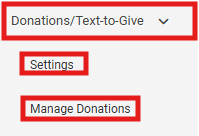
1. Migrated the Donation/Text-to-Give out of Manage Items and into its own dedicated section in the left-side menu.
- This update will not interrupt your current donation item, aside from removing it as the designated Donation/TTG item.
- For example, if your Donation/TTG was previously set as Item 100, that item will remain a standard donation item, and all existing donations tied to it will stay intact.
- After the migration, your item name will become the Donation/TTG title.
- If you have embedded your Donation/TTG link on your website, nothing will change, your link will remain the
same as the one listed under Donation/TTG Settings.
- The image you previously used for the item will
automatically carry over to the new Donation/TTG area.
- Added the option to show/hide the 'landing page navigation bar' on the donation page.
- added a Primary & Secondary color option.
- Custom questions are available
- To locate the custom questions and answers a field for 'Online Donations' was added to the 'Event Sales' report
- For more information please see the '[How To Article](https://support.cbo.io/donation/text-to-give)'
2. Integrations: Dashboard:
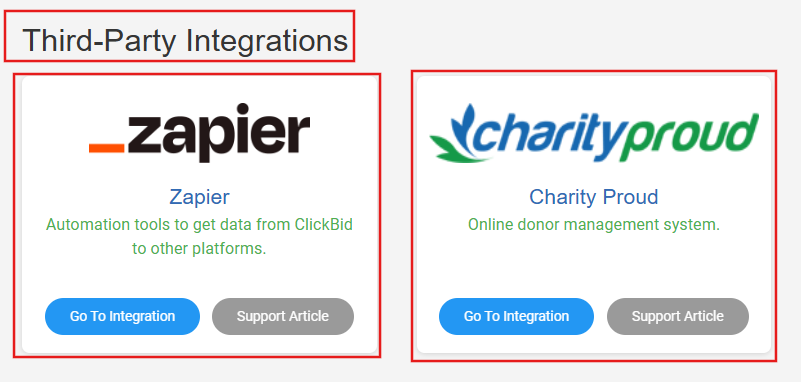
1. 1. Added a section header for 'Direct Integrations'
2. Added a section header for 'Third-Party Integrations"
3. Zapier integration is located under the Third-Party Integrations header.
- For more information please see the ['How To Article'](https://support.cbo.io/zapier)
4. Charity Proud integration is located under the Third-Part Integrations header.
- For more information please see the ['How To Article'](https://support.cbo.io/charityproud-integration)
3. QR codes: There is no longer a rate limit when creating QR codes.
4. Ticket Page: Payment: To reduce confusion around how guests can save a credit card on file, we’ve added helpful instructional text to the Ticket purchase flow.
- - Additional verbiage now states: "If you want to keep a credit card on file, select a guest from the dropdown and fill in the address fields. Then choose Credit Card and check the box that says 'Save this credit card for use at this event?'"
- The verbiage that was added will only appear on the ticket page if “Allow Purchaser to Keep Card on File” is set to Yes in the ticket page settings. If it is set to No, the verbiage will not display.
.png?width=426&height=250&name=image%20(48).png)
#### Issues Resolved:
1. Integrations: Bloomerang: When exporting toBloomerang, a sale from a ticket purchaser who was not converted to a bidder will still export to the correct constituent record.
2. Landing Page: Donate an Item Content Block: We’ve corrected the layout and sizing behavior of the Item Donation form content block to ensure the entire form displays properly across devices and screen sizes.
## Share:
###### Get The Latest Updates
##### Subscribe To Our Monthly Newsletter
No spam, notifications only about new products, updates.
[Subscribe](https://blog.cbo.io/release-notes/clickbid-13.251222-release#subscribe)
[Previous ClickBid 13.251124 Release](https://blog.cbo.io/release-notes/clickbid-13.251124-release)
[Next ClickBid 14.260101 Release](https://blog.cbo.io/release-notes/clickbid-14.260101-release)
## Related Posts
## Become a subscriber
Subscribe to our blog and get the latest updates straight to your inbox.
ClickBid
ClickBid’s Event Fundraising Platform is the premier software for charities, specializing in ticket sales, event promotions, and auctions.
[Pricing](https://clickbidonline.com/pricing/)
[Schedule a demo](https://try.cbo.io/demo/)
- [Resources](https://try.cbo.io/resources/)
- [Blog](https://blog.cbo.io)
- [Product Roadmap](https://try.cbo.io/product-roadmap/)
- [Comparison Calculator](https://try.cbo.io/calculator/)
- [Heads or Tails Generator](https://try.cbo.io/heads-or-tails-generator/)
- [Submit a Referral](https://try.cbo.io/referral/)
- [Features](https://try.cbo.io/features/)
- [Event and Auction Features](https://try.cbo.io/event-and-auction-features/)
- [Live Video EventStream](https://try.cbo.io/live-video-eventstream/)
- [Raise the Paddle](https://try.cbo.io/paddle-raise-events/)
- [Online Auctions](https://try.cbo.io/online-auction-software/)
- [Silent Auctions](https://try.cbo.io/silent-auction-software/)
- [Event Ticket Sales](https://try.cbo.io/event-ticket-sales/)
- [Mass Messaging](https://try.cbo.io/mass-messaging/)
- [Custom Event Pages](https://try.cbo.io/custom-landing-pages/)
- [Event Registration](https://try.cbo.io/event-registration/)
- [Fundraising Features](https://try.cbo.io/fundraising-features/)
- [Mobile Bidding Software](https://try.cbo.io/mobile-bidding-software/)
- [Online Donations](https://try.cbo.io/online-donation-platform/)
- [Peer to Peer Fundraising](https://try.cbo.io/peer-to-peer/)
- [Recurring Donations](https://try.cbo.io/recurring-donations/)
- [Text to Give](https://try.cbo.io/text-to-give-features/)
- Other Features
- [Integrations](https://try.cbo.io/integrations/)
- [AuctionGPT](https://try.cbo.io/auctiongpt/)
- [Dedicated Advisor](https://try.cbo.io/dedicated-advisor/)
- Company
- [About us](https://try.cbo.io/about)
- [Blog](https://blog.cbo.io)
- [Legalese](https://try.cbo.io/legalese/)
- [Contact us](https://try.cbo.io/contact-us/)
- [Trust Center](https://clickbid.trust.site/)
- [API Documentation](https://documenter.getpostman.com/view/28996908/2s9XxzuCTq)
##### Our Office
800 East Ellis Suite 533
Norton Shores, MI 49441
Phone: (800) 513-5097
Fax: (231) 799-4999
© 2002 - 2026. All rights reserved.
```json
{
"@context" : "https://schema.org",
"@type" : "BlogPosting",
"author" : {
"@type" : "Person",
"name" : "Jodi Merkins",
"url" : "https://blog.cbo.io/release-notes/author/jodi-merkins"
},
"dateModified" : "2025-12-22T15:59:57.783Z",
"datePublished" : "2025-12-22T15:59:57.000Z",
"headline" : "ClickBid 13.251222 Release",
"mainEntityOfPage" : {
"@id" : "https://blog.cbo.io/release-notes/clickbid-13.251222-release",
"@type" : "WebPage"
},
"publisher" : {
"@type" : "Organization",
"logo" : {
"@type" : "ImageObject",
"url" : "https://blog.cbo.io/hubfs/clickbid_logo_22-1.png"
},
"name" : "ClickBid"
}
}
```